
Spec MB Monitor
Simple PC Monitoring Tool
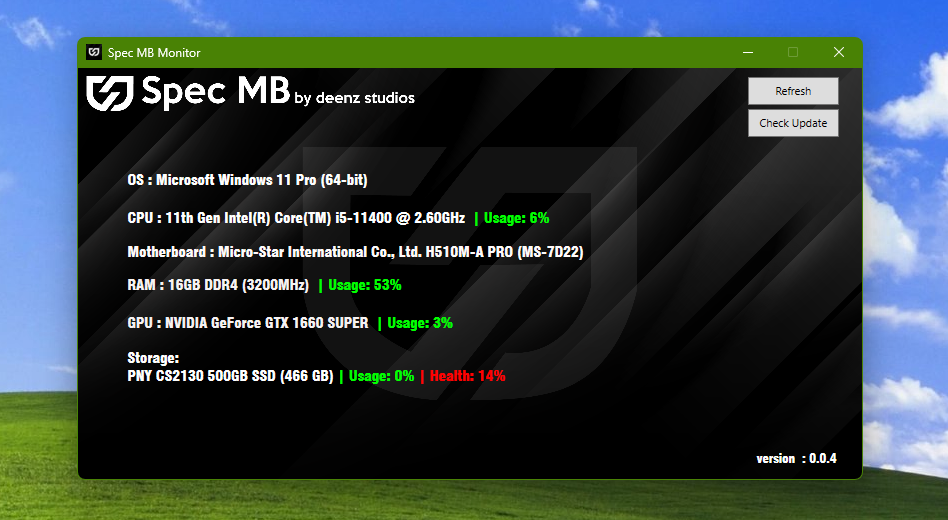
Instantly view your CPU, RAM, GPU, and Storage information in one click.
Notice:
Spec MB merupakan perisian bebas dan tidak menggunakan
sijil tandatangan digital rasmi Windows.
Sekiranya Windows Defender memaparkan amaran keselamatan,
sila tekan “More Info” dan “Run Anyway”
untuk meneruskan pemasangan.
Perisian ini selamat digunakan dan bebas daripada virus
atau perisian berbahaya.
Spec MB is an independent software and does not
use an official Windows digital signature certificate.
If Windows Defender displays a security warning,
please click “More Info” and “Run Anyway”
to continue the installation.
This software is safe to use and does not contain
any viruses or malicious software.
Version 1.0.5 • Windows 10/11
Download NowDownloads: 0
What's New in Version 1.0.5
• Penambahbaikan bacaan suhu CPU
Ads

Paid advertising space RM30/month. Contact us if interested. whatsapp : +6013-6242357
Key Features
Instant System Info
View CPU, RAM, GPU and Storage details instantly without navigating multiple menus.
Clean & Simple UI
Designed with a minimal interface for quick understanding and easy screenshots.
Perfect for Technicians
Ideal for PC repair and selling, making it easy to check and share system specifications.
About Spec MB
Spec MB is a simple PC monitoring tool designed for technicians and PC sellers.
It helps users quickly check system specifications without opening multiple system menus or tools.
Lightweight, fast, and easy to use with a clean interface.
Suitable for PC technicians, resellers, and everyday users.
Developed by Deenz Studios, focused on creating simple and practical tools.
More features will be added in future updates.
For feedback or bug reports, feel free to contact us at:
Privacy Policy
Spec MB respects your privacy. This application and website do not collect, store, or share any personal data or system information with third parties.
We do not use cookies to track users on this website, except for basic functionality provided by third-party advertising platforms (such as Google AdSense) which may use cookies to display relevant ads.
For more information on how Google uses cookies, please refer to Google's Privacy & Terms.
Disclaimer: Spec MB is provided "as is" without any warranties. The developer is not responsible for any damage or data loss resulting from the use of this software.
Last Updated: 2026